


After you select SharkPrint Staff Printing from the document, click the Print button on your document. It will not automatically print. (Note: Job stays in account for 6 hours) To Print your document, do the following:
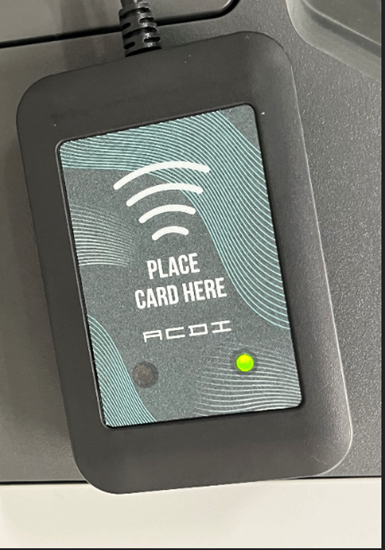
- Walk up to the copier and scan your NSU badge next to the card reader which will log
you into the copier.
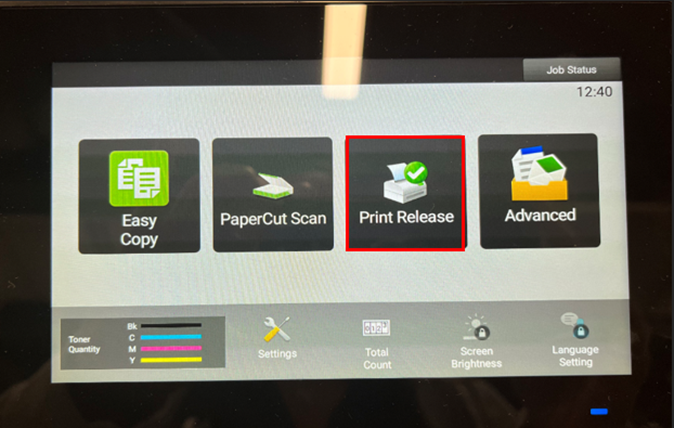
- Tap on Print Release
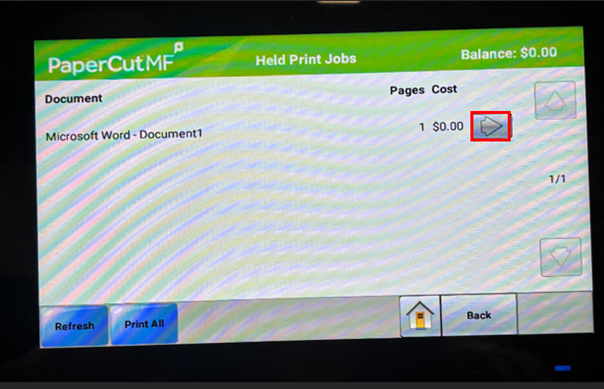
- Tap the right arrow to verify the print job.
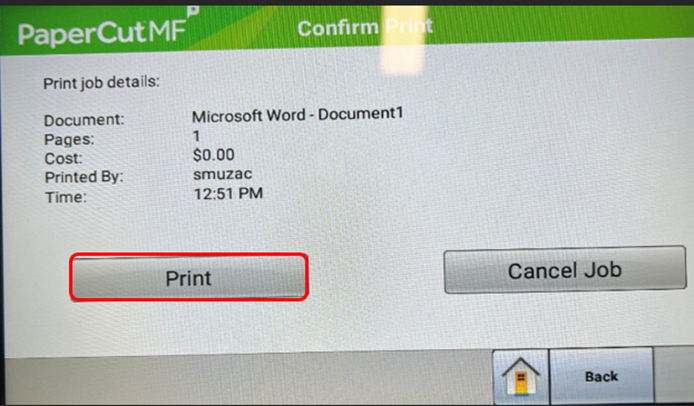
- If this is the correct print job, tap Print
SharkLink
SharkLink is NSU's online portal. With a single username and password, students, alumni, faculty, and staff members can easily access many online university applications.
Quick Guide
Students (PDF)Microsoft Online Archive
Faculty and Staff (PDF)
Current Hours of Operation
Monday-Friday: 8:30 a.m. – 5 p.m.
Saturday: Closed
Sunday: Closed
Closed on University Holidays
Holiday Schedule
Help Number for Students:
(954) 262-4357
Toll Free:
800-541-6682 ext. 24357
Help Number for Staff:
(954) 262-0070