Nova Southeastern University Office of Publications Search NSU Site Map Nova Southeastern University
 
Home
Our Services
NSU Digital Library
Staff/Contact Us
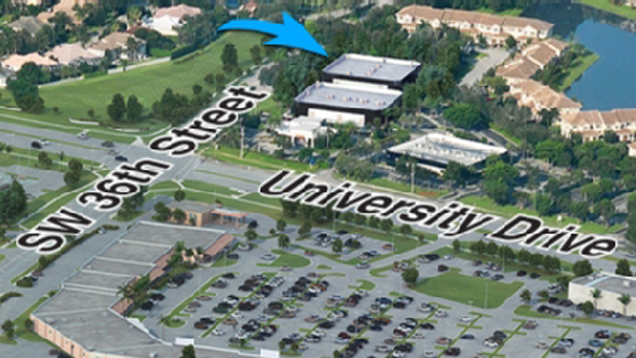
Office Location
Editorial Board
Document Templates
Requisition Forms
BSV Home

Print this page  

Our Services

Every project the Office of Publications produces for Nova Southeastern University is a representation of the university. We help our clients—NSU's administration, faculty, and staff—to present their messages by providing products that reflect NSU’s sophistication, capabilities, and vision. We strive to achieve excellence in promoting NSU and maintaining the university's brand identity.

Directory of Services

As a service of the university, the Office of Publications produces communication materials ranging from simple and economical pieces to complex packages and creative communication campaigns. We provide the following services:

  • art direction and graphic design
  • copywriting
  • editing
  • graphics for Web design
  • photography for publications
  • printing
  • short-run color copy flyers (up to 500)

The Office of Publications produces the following:

  • advertisements
  • booklets
  • brochures
  • business cards/vCards
  • catalogs
  • direct-mail pieces
  • display signage
  • eblasts
  • enewsletters
  • envelopes (all sizes)
  • flyers
  • manuals/handbooks
  • forms
  • invitation packets
  • letterhead
  • magazines
  • name badges
  • newsletters
  • postcards
  • posters
  • presentation folders
  • programs
  • stationery
  • Web banner ads

To provide design services, the Office of Publications uses the latest graphic design technology. The office uses outside vendors for printing and bindery services. The staff includes graphic artists and designers, an editor, an associate editor and copywriter, a graphic identity specialist? graphic designer, an administrative assistant, a production manager, and a production specialist. Our expertise in print production enables us to select qualified, competitively priced vendors; ensure job quality; and produce the finest products for your marketing and communication needs. Ultimately, we are here to serve you, the administrators, faculty members, and staff members of Nova Southeastern University.

The office staff takes job orders; provides writing, editing, and design services; estimates printing jobs; and supervises cost-effective printing services. All printing costs are passed on with no mark-up. Design, writing, and editing are also included at cost.

Requisition Forms

The Office of Publications uses two business forms for requisitioning services—the publications requisition and the print requisition. The publications requisition is used to order specialized print materials requiring design and editing (such as eblasts, brochures, booklets, advertisements, and invitations). The print requisition is used for ordering standardized printed materials such as letterhead, envelopes, business cards, and business forms. Standard materials can also be ordered through the Ariba catalog.

When using either form, please be sure to check the type of product you are requesting and complete the top section, including your account number, department, and contact information. If you have any questions, or need forms, please call (954) 262-8850.

Creating Your Publication

Once you have all your concepts and information together, bring it to the director or associate director in the Office of Publications to discuss your requirements. After studying your job, we will provide you with a cost estimate at your request, a job schedule, and an approximate delivery date.

The First Step--Determine What You Need

Communications materials are tools used to inform, identify, persuade, or elicit a response. The appearance, editorial content, photographs, graphics, and design of your piece combine to convey your message. The message can be conveyed through a variety of media, including newsletters, eblasts, postcards, brochures, etc. Determine which medium is best suited for your project. If you are uncertain, discuss your objectives with our director, who can help give direction to your concepts.

Plan Ahead

The process starts with a requisition. Completely fill out a publications requisition and return it to the Office of Publications. If design or writing services are needed, make an appointment with the director or a member of the design or editorial staff to talk about what you want your piece to accomplish, your target audience, your budget, and the piece's useful life. The size (number and size of pages), format, and quantity all determine the design, cost, and turnaround time. Do not wait until the last minute to bring in your jobs. Although office staff member have produced jobs in an extraordinarily short period of time, it is the exception, not the rule. For example, if a brochure is needed for an upcoming event in three months, initiate the production at least 60 days before the event.

The Office of Publications begins jobs upon receipt of requisitions. Each job is assigned a job number for tracking purposes. When inquiring about a job's status, provide the job number or the specific job description for a quicker response.

Provide All Elements for a Job

Submit all the job elements—copy, photographs, illustrations (or concepts), etc.—with the requisition. The Office of Publications will not be able to start a job that doesn't have all of its elements present. If you do not have time to write copy, or need assistance developing the concepts, writing services are available through the copywriter.

Time and money can be saved by providing your text via email to publish@nova.edu. The office uses Microsoft Word. Please do not format copy. Inserting tabs or justification only adds work for the editors or designers and slows down the production process.

All Jobs Are Edited

Upon initial submission, your text is edited by one of our editors. The editor checks style, spelling, grammar, and consistency. The editor's general familiarity with the university may enable him or her to catch factual errors, but the job author is responsible for ensuring that the document is factually accurate. All copy is edited so it is consistent with the style defined in the NSU Style Manual. Copies of the manual are available for free by calling the Office of Publications at (954) 262-8850 or can be downloaded from our Web site.

Saving Money

Time is money. When corrections and changes are made early in the job (at the proofreading stage), costs will be kept lower than when the changes are made at the ready-for-press stage. Design layout and typesetting begin after your copy has been edited and proofed. Job proofs are initially outputted on high-resolution laser or color printers. The typeset copy is returned to you for proofing and corrections. Take the time to review your piece in detail. Carefully compare the original (edited) copy with the information on the piece. The Office of Publications edits for style, not content.

One Last Look

A second round of proofing and a final sign-off will be made before the job is sent to the printer. It's very important to carefully read and review body text, headlines, cutlines beneath pictures, readouts, and other copy elements. Check the spelling of names. Dial telephone numbers to make sure they are correct. If you sense that something is wrong with the piece, trust your judgment and look again. It's better to take time now, rather than be embarrassed later.

So You Want to Make More Changes

Avoid late changes. The proof from the printer shows the piece exactly as it will be printed. It is the last possible opportunity for changes. However, changes made at this stage are very costly.

Copywriting Tips

Here are some ideas that should be considered when preparing copy for your printed product.

  • Use an outline. It's a must before embarking on a project.
  • Maintain a positive, consistent tone throughout the piece (e.g., serious, witty, academic, personal, informal, or lively).
  • Be concise. The shorter the piece, the better.
  • Use simple and direct language with easy-to-read words.
  • Support your text with strong titles and descriptive headlines and subheads.
  • Put the most important information at the beginning of the piece.
  • Make sure all the information is accurate.
  • Write for the target audience and to its level of expertise.
  • Use examples to illustrate your points.
  • Sentences of differing lengths and construction styles help to emphasize concepts.
  • Use proper paragraph development (topic, details, close) and avoid one- or two-sentence paragraphs.
  • Avoid editorializing. Use attribution and direct quotations to convey opinions.
Basic Editing and Proofreading

When proofing copy, consider the following:

  • Make sure the message is clear and concise.
  • Eliminate redundancy. If you said it once, that's enough.
  • Use professional diction or tone in your writing. Do not use slang unless absolutely appropriate.
  • Check for spelling with spell-check programs and a dictionary. If a word looks like it's spelled wrong, it probably is. Double-check hyphenation of prefixes and use correct, consistent capitalization.
  • Look for proper rendering of numbers—nine and below are spelled out, 10 and above are not.
  • Watch for balanced sentence length.
  • Be consistent in the use of first, second, and third person.
  • Check information accuracy.
    • Is information accurate and complete?
    • Is quoted material verbatim?
    • Are paraphrases accurate?
    • Will future events become past events by the date of publication?
  • Skim the entire document to get a sense of the layout and content.
  • Check for format consistency in headlines, capitalization, centering, margins, and line spacing.
  • Check spelling, punctuation, and grammar. Pay particular attention to little details, such as NSU's boilerplate, addresses, telephone numbers, and people's names. (A spelling tip: check copy by reading the entire document, word for word, backward.)
  • Review number styles, cross-check mathematical equations, cross-reference page numbers with table of contents listings, and review reference numbers.
  • Watch for missing words.
  • Be consistent with the uses of singular and plural.
  • Read fine print or statistical copy out loud to another person.
  • Check all editorial changes against original hard copy.
  • Make sure apostrophes are all the same style.
  • Check your advertisement size against the publication's order form or rate guide.
  • Make sure the NSU logo, appropriate accreditation statement, and notice of nondiscrimination (if required) are included.
  • Check headlines and subheads for content, length, and consistency of typeface.
  • Avoid awkward hyphenations, or individual words or letters at the end of lines and paragraphs.
  • Provide directions in addresses. Spell out compass directions. Do not put periods in direction abbreviations such as NE, SE, etc.
  • Time designations are in lowercase—a.m., p.m., noon.
  • Spell out percent; i.e., 12 percent.
  • Use proper dates (day, month, year) in titles, mastheads, etc.
  • Phone numbers
    • Use parentheses around area code—(954) 555-1212.
    • Extensions should be included when appropriate—(954) 555-1212, ext. 21234.
    • Toll-free numbers should be separated by a dash and do not include “1”—800-555-1212.
Photography and Illustration

Consider the following:

  • Submit only high-resolution digital images (no images take from the Web) that have good contrasting tones. A dark photograph reproduces poorly in print.
  • Send photos that clearly show people's faces, activity, and people with upbeat expressions.
  • Images are available for selection on the NSU publications Web site.
  • Any needed photo shoots are arranged by and art direct by NSU staff members.
Turnaround Times

Turnaround times are based on the amount and condition of the text copy provided, as well as the complexity of the design. Times may vary based on the number of proofs required and design revisions. Requisitions will only be marked "rush" when a specific time or date is indicated for completion.

From Print to Web

Often the content of a printed piece may also need to be used on a Web site. To facilitate the process of putting publications on the Web, design application files such as those created in InDesign, Adobe Illustrator, or Photoshop can be exported in HTML format or as PDF files. A PDF file can be viewed using Adobe Acrobat Reader, a free application that can be downloaded. The Office of Publications sometimes uses this format for sending design proofs to clients. If you will need your project prepared for the Web, please indicate this in the appropriate area of the publications requisition form.